Web Hosting vs Domain Name: What Is the Difference?
A domain name and web hosting are two different purchases that work together, not the same thing. This guide explains what each one actually does, then walks through registering a domain, choosing a hosting plan, and connecting the two.
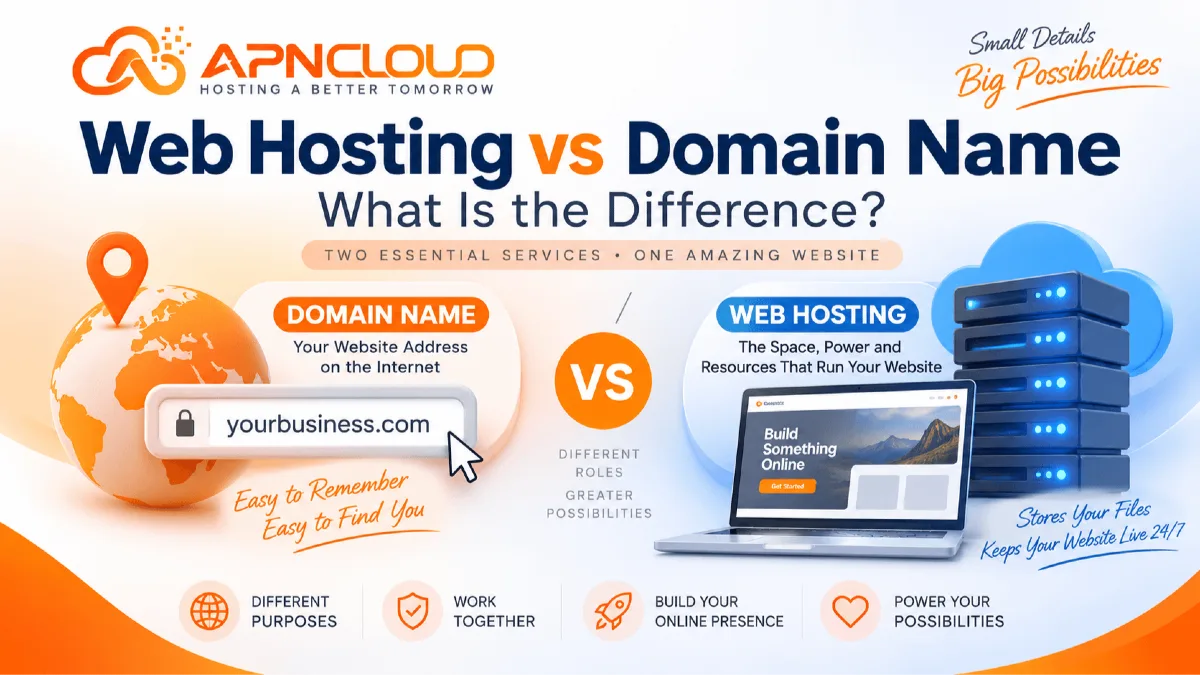
If you are building your website two terms will appear almost immediately: domain name and web hosting. Beginners often think domain name and web hosting are the same because both are needed to put a website online and many companies sell them together. In reality domain name and web hosting do jobs. Knowing the difference between web hosting and domain name is one of the important lessons for anyone building a business website, a personal blog, a portfolio, an online store, an organization website or a web application.
A simple way to see the link is to picture a business. Domain name works like the street address that customers use to find the business. Web hosting works like the building where the business really runs and keeps its equipment. On the internet domain name might be something such as yourbusiness.com. Web hosting contains the files, images, databases, scripts, emails and other technical resources that run the website. When someone types domain name into a browser the internet uses DNS information to find where web hosting is located and then connects the visitor to that server. That server sends the website content to the visitors browser.
Because domain name and web hosting work together it is easy for beginners to mix them up. You can buy domain name without buying web hosting away. You can buy web hosting before linking it to your domain name. You can even register domain name with one company. Buy web hosting from another provider. What matters is that domain name points, to the web hosting environment where your website lives. In this guide we will explain both domain name and web hosting from a beginner perspective compare their purpose talk about costs show how to link them look at how they affect website speed explain common mistakes and give a checklist you can use before launching your website. If web hosting itself is completely new to you, APN Cloud's beginner guide, What Is Web Hosting? A Complete Guide for Beginners, is also a useful starting point.
What Is a Domain Name?
A domain name is the to-remember address that people type into a browser when they want to go to your website. Of asking users to remember a servers number address, the Domain Name System, which is often called DNS lets websites use names that are easy to recognize. For example when a company signs up for a name that ends with things like.com,.net,.org or a country-specific ending that name can be the address for its website and other online services. A normal domain has parts. In a name like example.com "example" is the domain part and ".com" is the top-level domain, which is often called a TLD. You can also make subdomains like blog.example.com, shop.example.com or support.example.com based on what your website needs and how you set up your DNS.
Getting a domain does not automatically create a website. It just gives you the right to use that domain for a time as long as it stays registered and is renewed according to the rules from the company that sells domains. This is a difference when comparing web hosting and domains. Buying a domain is like reserving an address while buying hosting gives you the tools needed to keep and show your website. A domain can also be used for more than a website. For instance a company might set up email addresses using its domain make subdomains for different programs or send different DNS settings to different services. The DNS settings linked to the domain decide where those services should go. When picking a domain new people should usually look for something that's short easy to spell connected to their brand and not likely to confuse people.
Stay away from names that're too hard to spell too many hyphens or names that are hard to remember. You should also think about how the name will work for your brand in the run because changing a domain after a website is already known can mean setting up redirects updating search engines changing email addresses updating marketing and other technical tasks. Domain registration is therefore more than picking a name that is available. It becomes part of your identity. Keep your domain registrar account safe use login methods when possible keep your contact details up to date check when the domain needs to be renewed and make sure you are, in charge of the account that handles your domain.
What Is Web Hosting?
Web hosting is the foundation that keeps your website online and allows people to access it over the internet. When you build a WordPress site upload HTML files add images, store customer data in a database, install apps or set up business email accounts all of those things need to live on a server. That server must be ready to respond whenever someone visits your site. A hosting provider keeps the servers and systems running so your site can stay accessible. Depending on the hosting plan you choose your account might include storage space, processing power, memory, databases, data transfer limits, email accounts, security tools, backups SSL certificates, domain name settings, file management, FTP access, one-click app installers and a control panel to manage everything.
Shared hosting is often the choice for beginners. It lets multiple websites share the server and the hosting company handles most of the technical work. You take care of your site but you don’t need to manage the full operating system or server setup. For websites that grow or need power options like VPS hosting, managed VPS, cloud hosting or dedicated servers become useful. These offer control and better performance when your site needs extra resources or custom configuration.
It’s important to understand the difference between web hosting and domain names. Hosting is where your website lives and runs. The domain name is the web address that people type to find your site, like www.example.com. Think of it this way: you can have the domain name in the world but without proper hosting your site won’t load. You could create a website with hundreds of pages, product images, forms, downloadable files and a database—but those files need a place to be stored and a system to make them work. That’s what hosting provides.
Your domain name only helps visitors know where to go. It doesn’t store anything. Run your website. It’s the address. Hosting is the building where your site is located and operates. The kind of hosting you choose also affects how fast your site loads. Server speed, storage type, CPU power, memory, caching, web server software, database setup, network speed, resource limits and how well your apps are tuned all influence how quickly your pages load. This means even if your domain name is perfect poor hosting can make your site slow or unreliable.
Beginners should pick hosting based on what their site needs. Don’t just go for the plan. A small business site might work great on shared hosting.. If you’re running a custom app, with background tasks or special software you may need a VPS or cloud server to keep things running smoothly. For a deeper comparison of these hosting environments, see Shared vs VPS Hosting: Which Hosting Is Right for Your Website?.
Web Hosting vs Domain: The Main Differences
The easiest way to understand web hosting versus domain is to think about what you're actually buying. A domain gives your website a name, like a web address. It’s what people type into their browser to find your site. Hosting on the hand is where your website lives. It’s the space on a server where your website files are stored and where your site runs.
When you register a domain you usually handle things like the nameservers DNS records, contact details how long the domain will last, transfers, renewal status and domain security. All of these help make sure your domain is set up correctly and stays under your control. When you buy hosting you manage the files, databases, applications, storage, email accounts, PHP settings, SSL certificates, backups and even how much CPU or memory your site uses depending on the hosting plan. Domains are usually registered for a set amount of time—like one year or more. If you want to keep using the domain you need to renew it before it expires. Hosting is also billed on a recurring schedule. The cost is based on the resources you get like storage and bandwidth not on owning a web name.
Another big difference is portability. You can keep the domain even if you switch hosting providers. You just change the DNS settings to point to the hosting server after your site has been moved. You can also transfer the domain to a registrar without changing your hosting. This separation gives website owners freedom. For instance a business could register its domain with one company. Use APN Cloud or another service for hosting. It’s also possible to get both domain and hosting from the company. That can make things simpler for people who are just starting out.
Neither choice is better in every case. Both come with their security responsibilities. You need to protect your domain registrar account carefully. If someone gains access they could change your DNS settings. Redirect your visitors to a different site. Hosting security includes areas, like keeping your software updated using strong passwords setting proper file permissions protecting against malware securing the server, managing backups and configuring your site securely. Both domain and hosting are important. A great domain name won’t help if your hosting is slow or unreliable. Powerful hosting won’t help if your domain name is hard to remember or has expired. They each solve problems but they work together to make your website visible and functional.
Feature | Domain Name | Web Hosting |
|---|---|---|
Main purpose | Gives the website an address | Stores and runs the website |
Contains website files | No | Yes |
Uses DNS settings | Yes | Works with DNS |
Requires renewal | Usually yes | Usually recurring billing |
Affects branding | Strongly | Usually indirectly |
Affects server resources | No | Yes |
Can be purchased separately | Yes | Yes |
Can move independently | Yes | Yes |
Needed for normal public website access | Usually yes | Yes |
Main concern | Naming and addressing | Storage, resources, performance and operation |
Why Understanding the Difference Matters
Understanding the difference between hosting and a domain can help avoid frustrating errors when building a website. A common mistake that beginners make is when they register a domain wait for the website to show up and think something is wrong because the address shows a parking page or an error. The domain registration went through. There was no website hosting set up. The other way around can also happen. Someone might buy a hosting plan install a website but not connect a domain. In that case the website might only be available using an address or technical server details. Knowing how these two services work together makes the setup process much simpler.
The difference becomes more important when things go wrong. If your website files are missing a database is not. Your hosting account has reached a limit changing the domain will usually not fix the issue. If the domain has expired or the DNS records are pointing to the server adding more CPU or RAM to the hosting account will not fix the domain problem. Being able to tell which part of the system is at fault can save a lot of time when trying to solve problems. Business continuity is another reason to understand web hosting versus domain. Companies rely more and more on their websites and their branded email addresses for customer contact, marketing, online sales and support.
If the domain expires customers might not be able to reach those services even if the server is working. If hosting stops working the domain might still be registered,. The website might not load because the server is not running the application. Keeping both services up to date protected and set up correctly should be part of website management. Understanding the difference also helps when looking at hosting plans. Of thinking that a package, with a free or cheap domain is always the best deal look at storage, resources, backups, support, control-panel features, ability to grow renewal costs and what your website really needs. APN Cloud's guide on How to Choose the Best Web Hosting for Your Website in 2026 explains several of these hosting-selection factors in greater detail.
Step 1: Choose and Register the Right Domain Name
First practical step is picking a domain that can stand for your website for years. Begin with your brand, business name, service, personal identity or project name and draft a few domain ideas before you check if they exist. Your first pick may already be taken, so having backup options stops you from hurrying into a choice. For business sites being clear matters more than making a very clever domain. Ideally a visitor should hear the domain once. Know how to type it later. Keep the spelling simple avoid numbers or hyphens and think hard about how the name appears when written with no spaces. You should also choose a domain extension that fits your audience and brand.
A popular extension might be good for a business while a country‑specific extension can work better for a business that mainly serves one region. Before you register check whether the domain name clashes with a known company or protected brand in the markets that matter to you. After you decide on a domain register it with a registrar and enter accurate account details. Protect the registrar account with a password and stronger authentication when possible because owning the domain lets you control key DNS settings.
You should also know the renewal cost and registration period before you finish the purchase. First‑year discounts can be lower than renewal fees so look at long‑term costs instead of just the initial price. If automatic renewal is offered and fits your needs it can help prevent the domain from expiring but you should still keep an eye on billing methods and renewal notices.
Finally remember that just registering does not build your website. At this point you have secured its address. The following step in the web hosting, versus domain process is getting the infrastructure that will hold your website. Keeping this difference clear makes later setup easier because you know that domain management handles identity and DNS while website hosting holds your content and applications.
Step 2: Select a Hosting Provider and Suitable Hosting Plan
After registering your domain pick website hosting based on what you want to create. Someone just starting out who is building a company website, portfolio, blog, landing page or a regular WordPress project usually doesn't need to start with a server. Shared hosting can be a choice because the hosting company takes care of most of the technical stuff while you handle the website using a control panel. Before you buy think about what you need for your website, like storage space, databases, email accounts, how much traffic you expect the type of application, backups and how much technical knowledge you have. Don't just look at the storage number that is shown on the pricing page.
Things like CPU availability, memory limits, storage type, web-server setup, backup options, SSL support, database tools, how easy the control panel is to use. The level of technical support can be just as important. Website speed depends on both the infrastructure and how well the site is optimized, so picking the platform is more important than just getting the plan with the most disk space. You should also know if the service is managed or unmanaged. Shared hosting usually means you don't have to do server work yourself while an unmanaged VPS might mean you are responsible for things, like operating-system updates, firewall setup, software installation, backups, monitoring and keeping the server secure.
Beginners shouldn't go for hosting just because VPS sounds better. If your website only needs WordPress, PHP, a database, email, SSL and a simple control panel shared hosting might be easier to use. However if you need custom applications that require root access, special server setups, ongoing background tasks or unusual configurations then VPS hosting might be necessary. Check both the starting price and the cost after the promotion ends so that your hosting stays affordable once the special offer is over.
You can review APN Cloud's Web Hosting Cost in 2026: Complete Pricing Guide when planning a longer-term hosting budget. Once hosting has been activated, your provider will normally give you the technical information needed to connect your domain, such as nameservers or an IP address. This is where your previously separate domain and hosting services begin working together.
Step 3: Connect the Domain to Your Web Hosting
Connecting your domain to hosting is the step that turns two services into one working website. The exact procedure depends on your registrar and your hosting provider. The main idea stays the same: DNS must tell browsers which server should answer when someone asks for your domain. Hosting providers usually give you nameservers that you can enter into the domain registrar’s management panel. When you set your domain to use those nameservers DNS management for your domain is normally handled through the hosting environment or the chosen DNS service. Another way is to keep the nameservers and edit individual DNS records by hand.
For example an A record can point the domain to an IPv4 address while a CNAME can point one hostname to another. Email services may need MX records and verification or security services may use TXT records. Beginners should avoid making DNS changes because an incorrect record can affect the website, email or other connected services. Save the settings before major changes whenever possible and follow the instructions supplied by your hosting provider or DNS service. After you update DNS the change may not appear everywhere at the instant because resolvers and cached information take time to refresh. During a migration this can temporarily cause some visitors to reach the hosting environment while others reach the new hosting environment. That is why website migrations are normally prepared, on the hosting account before you change DNS.
When DNS points to your hosting server the hosting account must also recognize the domain. Depending on your control panel and plan you can add the domain as a domain, an additional domain, a website or another supported configuration. The server then knows which website files to serve when a request arrives for that domain. In terms DNS handles the direction and hosting handles the destination. This connection is the heart of web hosting versus domain: neither service replaces the other; they communicate. Once the connection works correctly you can test the domain from browsers or networks verify both the root domain and common hostname versions where configured and then proceed with SSL and the final website setup.
Step 4: Install the Website, Enable SSL, and Complete the Launch
Once your domain points to the hosting environment you can build or move the website. New users often use a content management system like WordPress because it gives an administration interface for pages, posts, themes, plugins, users and other website functions without needing every page to be coded by hand. Depending on your hosting provider an application installer may help with installation. You may upload an existing site using file-transfer or migration tools. During setup choose administrator passwords and do not use the same passwords from other places. Create the database if your application needs one check that the correct PHP or runtime requirements are met and make sure important files are in the right document directory.
The next important step is turning on HTTPS using an SSL certificate. HTTPS protects the communication between the visitors browser and your website. Must be set up before you share the site with others. After SSL is working make sure HTTP requests go to the HTTPS version and that pages do not load any resources that might cause browser warnings. You should also make backups before making changes to the site. A good backup plan needs to cover both website files and databases because restoring one might not fully bring back a dynamic site. Test contact forms, login pages, navigation, mobile views, email alerts, checkout processes if needed and key links before you go live. Check that DNS-related services like business email still work after any nameserver changes. This is important because changing nameservers without setting up the right email DNS records can stop mail even if the website is working fine.
Website performance should also be checked at this point. Compress images the right way get rid of extra plugins or scripts set up caching where possible and keep applications up to date. The hosting plan gives the resources but how you set up the website decides how well those resources are used. Finally create monitoring routines, for renewals, backups, security updates and website availability. Launching a website is not the end. Your domain must keep getting renewed your hosting must stay active. Your website software needs regular care. Looking at these areas as connected tasks makes managing the website much easier in the long run.
How Domain and Hosting Affect Website Performance
Both a domain and hosting play a part in delivering a website. They influence performance in very different ways. The hosting environment does the computational work needed to process application code, access databases read files create responses and deliver website resources. Therefore server CPU, memory, storage performance, web‑server configuration, caching, PHP workers, database efficiency, network capacity and resource limits can meaningfully influence website performance. The domain itself does not contain those computing resources. The domain role is mainly to provide addressing and DNS resolution. DNS still matters because a browser must determine where to send the request before it can contact the website server but buying a domain does not make a slow server faster.
This is a misconception to avoid when comparing hosting and domain. If a WordPress site loads slowly because it uses images, excessive plugins, inefficient database queries, a poorly optimized theme or insufficient hosting resources changing the domain name is unlikely to fix the underlying performance problem. Similarly moving to a hosting plan without identifying the actual bottleneck may not automatically solve every speed issue. Website optimization should examine the delivery process. A lightweight cached website on appropriate shared hosting may perform very well while a badly configured site on a powerful VPS can still be slow. Location and network routing can also influence latency especially when visitors are far from the server. A content delivery network may help distribute resources nearer to users for some projects although the benefit depends on website architecture and audience.
Storage technology is another factor because database‑heavy or file‑intensive workloads may benefit from storage but application design still matters. Businesses should therefore choose hosting based on requirements and monitor actual resource consumption as their website grows. If your site consistently approaches the limits of hosting requires additional server configuration or becomes substantially more resource intensive moving to a higher shared plan, VPS managed VPS or another appropriate environment may be reasonable. Performance decisions should be driven by measurements and workload requirements of assuming that one hosting category is automatically fastest, for every website.
Web Hosting and Domain Costs: What Should You Budget?
Domain registration and website hosting should normally be budgeted as separate recurring expenses even when a provider bundles them into one package. Domain pricing depends on factors such as the extension, registrar, registration term, promotions, and renewal rate. Some extensions cost relatively little while others can have considerably different registration or renewal fees. Certain hosting packages may include a domain for an initial period, but users should check what happens after that period ends and who controls the registration. Hosting costs vary more widely because hosting plans can provide significantly different infrastructure.
Shared hosting generally has a lower entry cost because customers share a professionally managed platform, while VPS and dedicated environments allocate more infrastructure and may involve additional management responsibilities. Managed services can cost more because administration or support work is included. When comparing web hosting vs domain costs, do not focus only on the checkout total for the first year. Create a longer-term budget that includes domain renewal, hosting renewal, optional backup storage, premium applications or themes where needed, email services, security products, developer work, migration expenses, and other tools that your project genuinely requires. Pay particular attention to promotional pricing.
A low introductory hosting rate can be useful when starting a project, but the renewal price determines what you will pay after the promotion ends. The same principle can apply to domain registrations. Read the billing term carefully and compare the annualized cost when plans use different billing periods. Businesses should also consider the cost of downtime or poor administration rather than selecting infrastructure solely because it is inexpensive. Choosing a plan that cannot reasonably support the website may result in repeated migrations or performance problems.
At the same time, purchasing an expensive server that a small informational website does not need can waste money. The goal is matching the service to the workload. A new business website might begin with shared hosting and move upward when real resource requirements justify the change. Keep ownership and billing records organized so you know where your domain is registered, where the website is hosted, when each service renews, which payment method is associated with the account, and who within the organization has administrative access.
Common Web Hosting vs Domain Mistakes to Avoid
Several beginner mistakes become much easier to avoid once you understand how domains and hosting interact. The first is believing that registering a domain automatically includes a functioning website. Unless the package specifically includes hosting and a website has been created, the domain is only the address. The second mistake is purchasing website hosting but forgetting to point the domain to it. The server may contain your website correctly, but visitors cannot reach it through the expected domain until DNS is configured. A third mistake is losing track of renewal dates. Domain expiration can interrupt access to websites and domain-based email, while expired hosting can make the website files or application unavailable according to the provider's service terms. Keep both services monitored separately even if they appear on the same invoice.
Another common problem is changing nameservers without understanding the existing DNS records. If email, verification records, subdomains, or third-party services depend on the current DNS zone, replacing nameservers without recreating necessary records can cause those services to stop working. The fifth mistake is choosing hosting based only on storage. A plan offering a large disk allocation is not automatically suitable if the website needs more CPU, RAM, processes, databases, application support, or other resources. Likewise, a VPS should not automatically be considered better than shared hosting. An unmanaged VPS may require significant technical administration, and a beginner who only wants to operate WordPress may receive little benefit from that additional complexity. Another mistake is using weak account security.
Domain registrar accounts and hosting accounts are both important targets because one controls website addressing while the other controls website data and applications. Use strong unique passwords, stronger authentication methods when available, and restrict administrator access to people who genuinely need it. Businesses should also avoid registering an important company domain using an employee's private account without clear organizational ownership and recovery procedures. Finally, do not migrate a live website by changing DNS first and preparing the hosting afterward. Prepare and test the new hosting environment, copy the website and database, verify configuration, create necessary DNS records, and then direct traffic to the new environment. Careful sequencing reduces unnecessary interruption.
Web Hosting vs Domain Checklist Before Launching Your Website
Before publishing your website, review both sides of the setup instead of checking only whether the homepage opens. Start with ownership. Confirm that the domain is registered under an account your business or project controls, that the recovery information is current, and that you know the renewal date and renewal price. Check domain security settings and stronger login protection where available. Next, examine DNS. Confirm that the domain points to the intended hosting environment and that required A, CNAME, MX, TXT, or other records have been preserved where necessary.
If you recently migrated between hosting providers, keep the previous hosting active until you are confident the new environment works correctly and normal DNS transition issues have passed. Now review website hosting. Make sure the selected plan provides sufficient storage, database capacity, email resources, CPU, memory, and other limits for your website. Confirm that your application version is compatible with the hosting environment. Check whether backups run as expected and understand how restoration works rather than assuming that simply having the word “backup” in a feature list guarantees every recovery scenario. Verify HTTPS and confirm that the SSL certificate loads correctly.
Test important pages on desktop and mobile devices, including navigation, forms, account areas, search, checkout functions, and contact information where relevant. Review website performance and optimize large images, scripts, themes, plugins, and caching. Confirm that administrative usernames and passwords are secure and that unnecessary accounts have been removed. Finally, document where everything is managed. Businesses should know the registrar, hosting provider, DNS provider if separate, login recovery process, billing schedule, application administrator, backup location, and support procedure. Keeping this information organized makes future troubleshooting and migration considerably easier.
Pre-launch checklist:
Domain registered and under your control
Correct domain contact and recovery information
Domain renewal date recorded
Hosting plan active
DNS records correctly configured
Website connected to the correct domain
SSL/HTTPS enabled
Website files and database backed up
Business email tested
Contact forms tested
Mobile layout checked
Important pages reviewed
Website performance checked
Strong administrator passwords enabled
Required applications updated
Renewal costs understood
Registrar and hosting login information stored securely
Backup and restoration procedure understood
Frequently Asked Questions About Web Hosting vs Domain
What is the main difference between web hosting and a domain?
A domain is the readable internet address people use to reach your website, while web hosting is the server environment that stores and runs the website itself. They are separate services but normally work together.
Do I need both a domain and web hosting?
If you want a normal public website using your own branded address, you will generally need a domain and some form of hosting or another platform capable of serving the website. Registering only a domain does not create the site.
Can I buy my domain and hosting from different companies?
Yes. Your domain can be registered with one provider while your website is hosted elsewhere. You then configure DNS so the domain points to the correct hosting environment. Many beginners prefer using one provider for convenience, but separating them is also common.
Can I change hosting providers without changing my domain?
Yes. The website can normally be migrated to another hosting provider while keeping the same domain. After preparing the new environment, DNS is updated so visitors are directed to the new server.
Does a domain affect website speed?
The domain itself does not provide server CPU, memory, or storage. DNS resolution participates in connecting users to the site, but website performance is much more strongly influenced by hosting infrastructure, network conditions, application configuration, caching, databases, images, themes, plugins, and optimization.
Is shared hosting enough for a beginner website?
For many blogs, portfolios, landing pages, company websites, and standard WordPress projects, good shared hosting can be a practical starting point because the provider handles much of the server infrastructure. More advanced hosting becomes useful when genuine resource or configuration requirements appear.
Choosing the Right Domain and Web Hosting
The important lesson in web hosting versus domain is that you do not have to choose one over the other. They handle parts of the same overall task. Your domain creates the identity that visitors use to find your website. Your hosting provides the infrastructure that stores your website content and processes requests from users. A strong website needs both areas to work together. Start by picking a easy-to-remember domain name that fits your brand. It should also be able to grow with your project as it expands. Make sure the registrar account is secure. Keep track of renewal dates so your domain doesn't expire. Understand how DNS works at a level because it connects your domain to your hosting.
Next pick a hosting plan that matches your needs instead of paying for powerful infrastructure just because it sounds impressive. A beginner business site, a portfolio or a WordPress blog can often work perfectly on shared hosting.. If you are running a growing application you may eventually need more CPU, more RAM, better isolation or more control over server settings. In that case VPS or another advanced hosting environment might be necessary. Connect your domain. Hosting carefully. Set up HTTPS to make your site secure. Test email. Contact forms to make sure they work. Keep backups of all your data. Always keep your website software updated to avoid security issues. Monitor your site’s performance over time to spot pages or other problems.
As your website grows your hosting needs can change without forcing you to switch domains. That flexibility is one of the benefits of understanding these services separately. APN Cloud offers website hosting options for types of projects. This means you can review the resources and management level that fit your website instead of treating every project the same way. Whether you are launching your company website starting a blog building an online portfolio or preparing a growing web project knowing how domains, DNS, servers and hosting plans work will help you make smarter technical and financial choices.
Ready to launch your website? Explore the hosting plans, at APN Cloud. Choose an environment that matches your websites requirements your budget, your expected growth and your level of experience.
Further Reading
Keep reading
Related articles

VPS Hosting for WordPress: Is It Better Than Shared Hosting?
Discover whether VPS hosting for WordPress is better than shared hosting. Compare speed, security, costs, scalability, and features to choose wisely.

How to Choose the Right VPS Hosting Plan for Your Website
Learn how to choose VPS hosting for your website. Compare CPU, RAM, storage, managed plans, security, pricing, and scalability before you buy.

How Much RAM Do You Need for a VPS Server? Complete Guide
Understand VPS RAM requirements and learn how much memory your server needs. Compare 1GB to 16GB VPS plans, improve performance, and choose the right RAM.
Never miss a post
Fresh guides, product updates and hosting resources from the APN Cloud team.