Shared vs VPS Hosting: Which Hosting Is Right for Your Website?
Shared hosting and VPS solve different problems at different price points. Compare how each one actually works, where control and performance diverge, and how to tell which one fits your site.
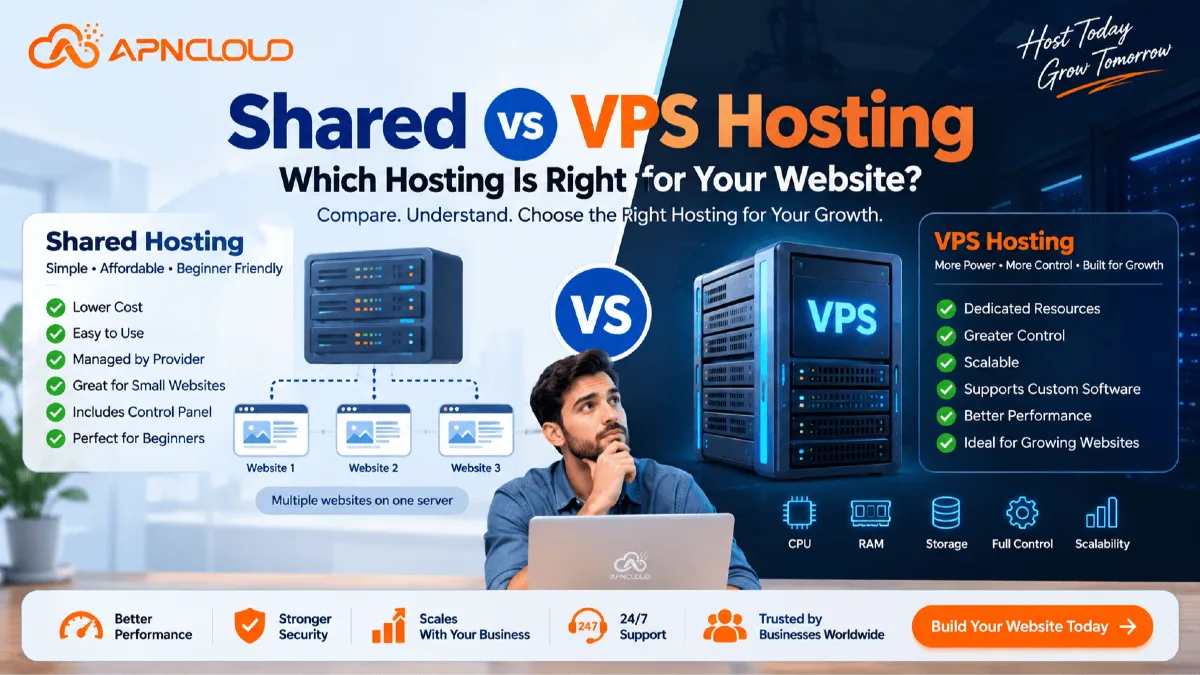
Choosing a hosting plan seems easy until you start looking at the choices. You might come across hosting, WordPress hosting, cloud hosting, VPS hosting, managed VPS, dedicated servers and other services that all seem to do the same thing. They all help keep your website. For people starting out one of the most common choices is shared hosting versus VPS hosting. Both options can host a business website, a blog, a portfolio, an online store or a web application.. They are built for different stages of growth and different amounts of technical work.
Shared hosting is usually made to keep website hosting simple. The hosting company takes care of the server setup while many users share the physical server. You typically get a control panel where you can handle your domain, files, databases, email accounts, SSL certificates, backups and apps without dealing with the server itself. A Virtual Private Server or VPS works in a way. A physical server is split into virtual servers using a special technology. Each VPS gets its environment and set resources. Some services let you have root access, which means you have control over the software and how the server is set up.
That extra control can be helpful. It also means more work. For a website with steady traffic shared hosting often has everything you need without the hassle of managing a server. For a business that is growing a website that uses a lot of resources a custom app, a development area or a project that needs server software a VPS might be a better fit.
This guide looks at shared hosting versus VPS hosting from a real-world point of view. We will look at performance, resources, security, control how easy it is to grow, cost, how easy it's to use what kind of maintenance is needed and when each option is best. You will also find out how to choose the one, for your website now and when it might be time to move up later. If you are completely new to hosting, you may first want to read our guide: What Is Web Hosting? A Complete Beginner’s Guide.
Why the Shared vs VPS Hosting Decision Matters
Your hosting environment sits behind everything that visitors see on your website. When a visitor opens a page the server may need to read files run PHP or another scripting language talk to a database carry out application logic pull cached data and then send the answer back to the visitor. The size and setup of that server can therefore affect website speed, reliability, ability to grow, security choices and the level of control you hold over your application. Choosing a hosting plan that's far larger than your real needs can bring extra cost and extra technical effort. On the side choosing a hosting plan that is too small can later lead to slow performance or block you from using the software your project needs.
The important question is not: "Which type of hosting is more powerful? A VPS normally gives you server‑level control and separate resources but a higher level of power does not always mean it is the best choice for every website.
The useful question is: "Which hosting environment matches my websites current needs and the way I want to manage it?” Consider a small company website that has ten pages a contact form, company information and a blog. That website may get a hundred visitors each day. The owner does not want to set up Linux manage the security of the server, install web server packages or fix operating‑system issues.
A set up shared hosting plan can be perfect, for that situation. Now think about a platform that runs background jobs a custom API, many databases, special PHP modules, a Node.js service and several integrations. The development team needs control over the server environment. Expects the use of resources to grow. A VPS could make more sense. Understanding the difference helps you avoid both buying little and buying too much hosting.
What Is Shared Hosting?
Shared hosting is a kind of website hosting where several hosting accounts run on the physical server. The server’s CPU, memory, storage, network connection and other system resources are shared among customers. The hosting provider sets up. Oversees the entire server giving each account its own limits and allocated resources. The easiest way to picture shared hosting is like an apartment building. Many people live in the building and use the same main facilities—like the structure, electricity, water, entrance and common areas.. Each person has their own private apartment.
In the way customers on a shared hosting server each have their own hosting account while using the same server hardware underneath. Even though its shared modern shared hosting platforms can still apply account-level restrictions and isolation. So "shared" doesn’t mean that every user can access or interfere with someone ’s data or resources.
For website owners one big benefit is simplicity. Of handling a Linux server through command-line tools you usually get a web-based control panel. Depending on your hosting provider and plan this panel might include:
File management
FTP accounts
Domain management
Subdomains
DNS-related tools
MySQL databases
Email accounts
SSL certificates
PHP configuration
Scheduled cron jobs
Application installers
Website backups
Restore tools
Usage statistics
This makes shared hosting very helpful, for beginners, small businesses, bloggers, students, freelancers, portfolio websites and standard WordPress sites. You can explore APN Cloud's Shared Hosting plans if you want to see an example of shared website hosting designed around a control-panel environment.
How Shared Hosting Works
Behind your hosting account is a server that has been set up by the hosting provider. The provider takes care of the server setup and usually handles tasks like keeping the operating system updated setting up the web server, managing network services handling hardware and taking care of the overall platform.
Your account runs inside that setup. When you upload a WordPress website for example your files are stored in your account. Your website connects to its database, domain, PHP setup, SSL certificate and other services that are part of your account. You usually do not get access to the entire server.
If every customer had control it would make a multi-user hosting setup hard to manage and less safe. Instead the hosting provider decides which software and settings are available. For regular websites this setup works well because the customer doesn’t actually need full control in the first place. You can focus on creating and managing your website of taking care of the server underneath it.
Main Advantages of Shared Hosting
1. Easy for Beginners
Shared hosting removes much of the technical work associated with server management. A beginner can typically purchase a hosting plan, connect a domain, install WordPress or another supported application, enable SSL, create email accounts, and begin building a website without learning Linux administration.
2. Lower Entry Cost
Because one physical server supports multiple customers, the infrastructure cost can be distributed across many accounts. This allows shared hosting plans to be offered at relatively affordable prices compared with isolated server environments.
3. Server Administration Is Handled for You
The hosting provider manages the underlying server. You are normally responsible for your website, plugins, themes, applications, passwords, content, and account configuration, while the provider handles the broader hosting infrastructure.
4. Convenient Control Panel
A hosting control panel can centralize common tasks such as file management, database creation, domain setup, email management, backups, SSL, and application installation. For users who do not want to work from the command line, this can be a major advantage.
5. Suitable for Many Common Websites
Shared hosting can work well for:
Company websites
Personal blogs
Portfolio websites
Landing pages
Small informational websites
Community websites
Beginner WordPress websites
Small online stores with moderate requirements
School or organization websites
Development and test sites
Not every website needs its own virtual server.
What Is VPS Hosting?
VPS stands for Private Server. A VPS hosting platform uses virtualization technology to split one server into several virtual machines. Each virtual server behaves like a separate server than a typical shared hosting account.
The VPS can have its own:
Operating system
CPU allocation
RAM allocation
Storage allocation
Network configuration
IP address
Server packages
User accounts
Security configuration
Web server
Database services
Application stack
Depending on the VPS product customers may also receive root access. Root access gives control over a Linux server. It allows experienced users to install software change system settings, create services manage firewall rules set up web servers, control packages and tailor the environment for their applications. This freedom is one of the differences, between shared hosting and VPS hosting. You can view APN Cloud's Cloud VPS Hosting options to understand how VPS hosting differs from a standard shared hosting environment.
How VPS Hosting Works
Picture a physical server that has plenty of computing power. Virtualization software builds virtual machines on that server. Each VPS works as its separate environment, with its own set of resources and its own operating system. From a customers point of view a VPS can act much like an independent server. For example you can deploy a Linux VPS connect via SSH, update system packages install a web server, configure PHP create databases set firewall rules install a control panel and then deploy your application. The underlying hardware may still be shared with virtual servers yet your VPS environment is far more isolated, than a normal shared hosting account. This separation is what makes VPS hosting so flexible.
Self-Managed vs Managed VPS Hosting
One important detail beginners often miss is that VPS hosting and managed VPS hosting are not necessarily the same service.
Self-Managed VPS
With a self-managed VPS, the hosting provider generally supplies the virtual server infrastructure while you manage the operating system and applications. Depending on the provider, your responsibilities may include:
Initial server configuration
Software installation
System updates
Security configuration
Firewall management
Web server configuration
Database administration
Backup configuration
Troubleshooting
Monitoring
Application deployment
Self-managed VPS hosting is therefore best suited to users who already understand server administration or have someone who can manage the server.
Managed VPS
Managed VPS hosting reduces the amount of server administration the customer must perform. The exact management scope varies by provider, so you should always read the service description before purchasing. For businesses that need dedicated VPS resources but do not want to manage everything themselves, a managed VPS can provide a useful middle ground. APN Cloud also provides Managed Cloud VPS for customers who want VPS-level resources with additional server management support.
Shared vs VPS Hosting: Quick Comparison
The following table summarizes the major differences.
Feature | Shared Hosting | VPS Hosting |
|---|---|---|
Server environment | Shared hosting platform | Isolated virtual server |
Typical cost | Lower | Higher |
Beginner friendly | Very high | Moderate to advanced |
Root access | Usually no | Usually available |
Server management | Mostly provider-managed | Depends on managed/self-managed plan |
Resource isolation | Account-level | Stronger virtual-machine isolation |
Custom software | Limited | Highly flexible |
Operating system control | No | Usually yes |
Scaling potential | Good within shared plans | Greater flexibility |
Control panel | Usually preconfigured | May need installation/configuration |
Maintenance responsibility | Lower | Higher on self-managed VPS |
Best for | Standard websites | Growing/custom/resource-intensive projects |
Technical knowledge required | Low | Medium to high unless managed |
Configuration flexibility | Limited | High |
This table provides a useful overview, but the right decision depends on how each difference affects your actual website.
Shared vs VPS Hosting Performance
Website performance is often the first reason people consider moving from shared hosting to VPS hosting. However, the subject is more complicated than simply saying: “VPS is always faster.”
A well-optimized website on quality shared hosting can perform better than a poorly configured website on an oversized VPS. Performance depends on many factors, including:
Server hardware
CPU performance
RAM
Storage technology
Web server configuration
Database optimization
Caching
PHP configuration
Application quality
Theme and plugin quality
CDN usage
Image optimization
Traffic patterns
Network routing
Location of visitors
Resource limits
Shared hosting is optimized around convenience and efficient use of a managed platform. A good hosting provider can configure the server stack for common workloads such as WordPress and PHP websites. A VPS gives you more control over the environment and typically provides clearly allocated virtual resources. However, you must also configure the server correctly.
For example, installing a new Linux VPS and placing WordPress on it without caching, security tuning, database configuration, PHP optimization, or web server optimization will not automatically guarantee excellent website performance. The important advantage of VPS hosting is not magical speed. It is greater control and resource flexibility.
Traffic and Resource Usage
Visitor count alone is not enough to determine whether you need VPS hosting. Two websites receiving 10,000 visitors per month may use dramatically different amounts of server resources. Consider these examples.
Website A
A small business website contains:
12 static pages
A lightweight WordPress theme
Optimized images
Page caching
A contact form
A small blog
Even with regular traffic, the resource requirement may remain modest.
Website B
Another website receives the same number of visitors but includes:
WooCommerce
Hundreds of products
Complex product searches
Customer accounts
Dynamic pricing
Multiple plugins
API requests
Background tasks
Frequent database operations
Website B can require significantly more CPU and memory. Therefore, do not choose between shared vs VPS hosting based only on visitor numbers. Look at the workload.
Resource Allocation: Shared Hosting vs VPS Hosting
Resource allocation is one of the most important technical differences.
Shared Hosting Resources
On shared hosting, your account normally operates within limits established by the hosting provider. Depending on the service, these may include:
CPU limits
Memory limits
Storage limits
Process limits
Database limits
Inode limits
Email limits
Concurrent connection limits
These controls allow the provider to maintain a stable environment for many customers. For ordinary websites, the available resources may be more than enough.
VPS Resources
A VPS normally comes with specified virtual resources such as:
vCPU cores
RAM
NVMe or SSD storage
Bandwidth or transfer allocation
IPv4/IPv6 addresses
You have much greater freedom to decide how these resources are used. You could dedicate more memory to MySQL, configure PHP workers, run background processes, deploy multiple applications, install caching services, or use the VPS for other supported workloads. The flexibility is valuable when your application has requirements that standard shared hosting cannot easily accommodate.
Control and Customization
Control may be the deciding factor between shared and VPS hosting.
Shared Hosting Control
Shared hosting gives you control over your website account rather than the entire server. You can usually manage your website, databases, files, email, DNS-related settings, SSL, and other features through your hosting panel. However, server-wide settings remain under the control of your hosting provider. For the majority of beginners, this is an advantage rather than a limitation. There is less to break and less to maintain.
VPS Control
A VPS can give you administrative-level control. You may be able to choose your operating system and install technologies such as:
Apache
Nginx
LiteSpeed or OpenLiteSpeed where applicable
MySQL
MariaDB
PostgreSQL
Redis
Node.js
Python
Docker
Custom PHP versions
Development tools
Monitoring software
Specialized application services
This can be essential for developers and custom applications. But remember: every additional layer you control is also another layer you may need to maintain.
Security: Shared vs VPS Hosting
Security is another topic where simple statements can be misleading. A VPS is not automatically secure simply because it is isolated. Likewise, shared hosting is not automatically insecure simply because multiple accounts exist on one server. Security depends on the entire stack.
Shared Hosting Security
On shared hosting, the provider normally manages server-level security. As the website owner, you still need to:
Use strong passwords
Enable HTTPS
Update WordPress or other CMS software
Update themes and plugins
Remove unused software
Restrict administrator accounts
Maintain backups
Avoid installing untrusted scripts
Protect login pages
Review suspicious activity
The advantage is that server administration is handled by the provider.
VPS Security
With an unmanaged VPS, more responsibility shifts to you. You may need to consider:
Operating-system updates
SSH configuration
Firewall rules
User permissions
Root access security
Service configuration
Database exposure
Malware protection
Log monitoring
Backup policies
Open ports
Package vulnerabilities
A VPS provides more security control, but that control only helps when the server is managed correctly. For a business without Linux administration experience, a professionally managed hosting environment may actually be safer operationally than attempting to maintain an unmanaged VPS without the required knowledge.
Ease of Use
For beginners, shared hosting is usually the clear winner. A shared hosting account may be ready to use immediately after activation. You log in to the hosting control panel and begin working on your website. VPS hosting can involve additional steps. A new self-managed VPS may initially provide little more than:
An operating system
IP address
Root credentials or SSH access
Allocated computing resources
You may then need to configure the environment. If you prefer VPS resources but do not want this responsibility, managed VPS hosting can reduce the technical workload.
Cost: Shared vs VPS Hosting
Shared hosting is generally the more affordable option because infrastructure is shared efficiently among many accounts. For a beginner launching a company website, paying for resources and server administration capabilities that are not required may provide little practical benefit. VPS hosting normally costs more because it provides a larger or more isolated allocation of infrastructure. But the monthly hosting price is only part of the cost. When comparing hosting plans, consider the total operational cost.
For an unmanaged VPS, you might need:
Server administration time
A paid control panel
Backup storage
Monitoring tools
Security tools
Software licenses
Technical support
Administrator assistance
Therefore, never compare a $5 shared hosting plan and a $5 VPS as though they provide the same type of service. The products may have completely different management responsibilities.
Scalability
Your first hosting plan does not need to be your final hosting plan. A common mistake is purchasing a much larger server because you hope your website will become popular in the future. Growth is good, but you should make decisions using realistic requirements. Shared hosting often provides several upgrade levels. You may start on a basic plan and move to a larger shared plan as storage, traffic, databases, email, or resource usage increases. Eventually, if your website requires more control or consistently needs more resources, you can migrate to VPS hosting.
This progression is normal: Small Shared Hosting → Larger Shared Hosting → VPS → Larger VPS → Dedicated Infrastructure
Not every website will follow every stage. Some websites remain successfully on shared hosting for years. Others need VPS hosting from the first day because of their software architecture. The right approach is to choose enough capacity for your current needs with a reasonable amount of room for growth.
Reliability and Website Availability
Both shared and VPS hosting can provide reliable website hosting when the underlying infrastructure is well managed. A VPS does not eliminate downtime.
Problems can still occur because of:
Application errors
Software bugs
Incorrect configurations
Database problems
Network issues
Hardware failures
Resource exhaustion
Security incidents
Operating-system problems
In fact, a self-managed VPS introduces additional ways the customer can accidentally affect availability. For example, an incorrect firewall rule could block website traffic. A broken package upgrade could stop a service. A poorly configured database could consume available memory. Shared hosting reduces this administrative responsibility because the provider controls the underlying environment. When reliability is important, evaluate more than the hosting type.
Also consider:
Backup availability
Support
Monitoring
Storage technology
Network infrastructure
Upgrade options
Provider reputation
Service terms
Which Websites Are Best for Shared Hosting?
Shared hosting can be a strong choice for a surprisingly wide range of projects. Many people find shared hosting to be a fit for many different types of sites.
Small Business Websites
A typical small business website may contain company information, services, contact details, testimonials, a blog and lead‑generation forms. Small business websites often need basic features. Because of this small business websites usually do not need server control. They can rely on shared hosting for all their hosting needs.
Personal Blogs
WordPress blogs and other content websites can run comfortably on hosting. Adding caching and image optimization can improve performance for these blogs.
Portfolio Websites
Designers, photographers, developers, freelancers and other professionals can host portfolio websites on hosting. They do not need to operate their server.
Landing Pages
Landing pages, for marketing campaigns usually have hosting requirements. Only if they get heavy traffic do they need more advanced hosting.
Beginner WordPress Websites
Shared hosting is one of the ways to learn WordPress. Because the server environment is already configured beginners can start quickly.
Small Ecommerce Websites
Small ecommerce websites can also run on shared hosting plans. However growing stores should keep an eye on database activity, CPU usage, traffic and checkout performance.
Which Websites Are Better Suited to VPS Hosting?
VPS hosting becomes more appealing when VPS hosting needs go beyond the limits of a shared environment.
Custom Web Applications
Applications built with custom frameworks may need server packages, services, ports or runtime versions.
Growing Ecommerce Platforms
A busy online store can create database requests, many customer sessions, background jobs, search tasks, API calls and admin work.
SaaS Applications
Software-as-a-Service platforms may need custom application servers, queues, workers, databases, APIs and deployment workflows.
Development Environments
Developers may need SSH access, package installation Git workflows, containers, staging services or custom server configurations.
Agencies Hosting Multiple Projects
Agencies managing customer websites may eventually benefit from more isolation, control and resource allocation.
Applications, with Background Workers
Some applications need processes, queue workers, schedulers or services that are hard to run in a normal shared hosting environment.
Step-by-Step Guide: How to Choose Between Shared and VPS Hosting
Instead of guessing which hosting type sounds better, use the following process.
Step 1: Identify What You Are Hosting
Write down exactly what you intend to run.
For example:
WordPress website
WooCommerce store
Company website
Laravel application
Node.js application
Forum
Portfolio
Blog
Customer portal
SaaS application
API
Learning project
The software itself can immediately narrow your choices. A standard WordPress website can usually start on shared hosting. A custom application requiring system packages may require a VPS.
Step 2: Check Software Requirements
Review the requirements of your application.
Ask:
Which programming language does it use?
Which version is required?
Which database does it need?
Does it require Redis?
Does it need command-line access?
Does it require background services?
Does it need a particular web server?
Does it require Docker?
Are custom ports necessary?
Does it need special PHP extensions?
If the software works within the provider's shared hosting environment, shared hosting remains an option. If you require control over system packages or services, VPS hosting becomes more appropriate.
Step 3: Estimate Resource Requirements
Try to understand how demanding your application is.
Look at:
Current traffic
Expected traffic
Database size
Storage requirement
Number of websites
Dynamic requests
Background jobs
Media usage
Number of users
Ecommerce activity
API requests
Do not worry if you cannot calculate exact CPU and RAM requirements. The goal is simply to determine whether the website is lightweight, moderate, or resource intensive.
Step 4: Decide How Much Control You Need
Ask yourself one important question:
Do I need to control the server, or do I only need to control my website?
If you only need to:
Upload files
Install WordPress
Create databases
Add domains
Create email accounts
Enable SSL
Manage backups
shared hosting may be enough.
If you need to:
Install system packages
Configure services
Control the operating system
Modify firewall rules
Run custom daemons
Configure Docker
Change server software
consider VPS hosting.
Step 5: Consider Your Technical Experience
A VPS is not just a larger hosting account. Especially with self-managed VPS hosting, it is a server administration responsibility.
Ask whether you or someone on your team understands:
Linux
SSH
File permissions
Web servers
Databases
Firewalls
Software updates
Backups
Server security
Log analysis
If the answer is no, shared hosting or managed VPS hosting may be more practical.
Step 6: Set a Realistic Budget
Consider both direct and indirect costs. Shared hosting may include many tools in one package. VPS hosting may require additional software, backup systems, control panels, or administrative support. Compare the complete solution rather than the advertised server price alone.
Step 7: Plan for Reasonable Growth
Your hosting should support growth, but you do not need to purchase infrastructure for traffic that does not yet exist. A startup website receiving 500 visitors per month does not necessarily need infrastructure sized for one million visitors. Choose a plan that meets current requirements and confirm that upgrades are available.
Step 8: Review Support and Migration Options
Before choosing a hosting provider, ask:
Is technical support available?
Are backups included?
Can I upgrade plans?
Is migration assistance available?
Can I move from shared hosting to VPS later?
Is managed VPS available if I need more resources without managing the server myself?
A clear upgrade path makes the initial decision much easier.
When Should You Upgrade From Shared Hosting to VPS?
There is no number that tells every website owner when its time to upgrade their hosting. Instead look for signs that indicate you need something
1. You Regularly Reach Resource Limits
Occasional spikes in traffic do not always mean you need a VPS. If your website keeps hitting limits for CPU, memory, processes or other resources while its running normally you might need more power. First check if you can improve performance. A optimized plugin or a slow database query can use up resources no matter what kind of hosting you have. If you fix those issues and still need power it might be time to upgrade.
2. Your Application Requires Software That Is Not Supported
This is one of the reasons to switch. If your project needs software that you can't install on your shared hosting account a VPS offers a setup.
3. You Need Root Access
Developers might need root access to set up server services, install packages manage users handle networking and adjust application environments. Shared hosting blocks this kind of access.
4. Your Business Needs Isolation in the Hosting Environment
As your applications become more important for your business you might want a separate virtual space, with clearly assigned resources and settings.
5. You Need a Custom Server Setup
Your application might need database settings, custom caching, worker processes, web server rules or runtime options. A VPS allows for freedom in how you set things up.
6. You Are Hosting Heavy Websites
A top-tier shared plan can handle many average websites but if you run a lot of busy sites you might eventually need more control over how resources are used.
Shared vs VPS Hosting for Small Businesses
For small company websites simple design provides real business value. Business owners normally want to update content receive customer inquiries keep branded email addresses manage SSL certificates and keep the website online. They do not necessarily want to become Linux administrators.
For that reason shared hosting is often a choice, for small businesses. When small company websites grow into complex applications—customer portals, internal systems, large ecommerce platforms, APIs or custom software—VPS hosting becomes a stronger choice.
What APN Cloud Users Can Consider
APN Cloud provides different hosting paths so a website can start with a relatively simple environment and move to more advanced infrastructure when necessary. For standard websites, blogs, portfolios, business sites, and many WordPress projects, you can review APN Cloud Shared Hosting. If your application requires greater server control, isolated virtual resources, or custom configuration, review APN Cloud Cloud VPS Hosting. If you need VPS-level infrastructure but prefer additional assistance with server management, you can explore Managed Cloud VPS Hosting. The important point is that you do not need to choose the most powerful option simply because it exists. Choose the hosting environment that solves today's requirements while giving your project a sensible upgrade path.
Final Shared vs VPS Hosting Recommendation
For beginners who are building a normal business website, a portfolio, a blog or starting a new WordPress project shared hosting is usually the best place to begin. It keeps things by reducing technical responsibilities. It generally costs less. Includes all the tools you need to run typical websites without having to manage an operating system.
You should consider VPS hosting when you actually need it. There are reasons to choose it such as:
Needing custom software that isn't available on shared hosting
Wanting root access to your server
Looking for greater control over your environment
Using specific server packages or configurations
Running background services like email servers or databases
Having consistently high resource usage
Hosting more complex applications
Requiring better isolation between different environments
If you want those benefits but don’t want to handle the full responsibility of managing a server yourself managed VPS hosting can be a better fit. It gives you the power you need while still offering support. Keep in mind that hosting is not a one-time choice. Your website will grow over time. A small site might start on hosting then move to a larger shared plan and eventually switch to VPS infrastructure when business growth makes the extra resources and flexibility worth the cost. This approach is often much smarter than paying for more than you need, from the start.
Frequently Asked Questions About Shared vs VPS Hosting.
1. What is the main difference between shared hosting and VPS hosting?
The main difference is how the server is set up and handled. Shared hosting puts website accounts on a platform that the provider manages while VPS hosting gives you a separate virtual server with its own resources and usually more control. I find hosting simple to use and I see VPS hosting offers more power. Shared hosting is about simplicity. I find hosting easy to use. VPS hosting is about control and flexibility. I think VPS hosting gives you power.
2. Is VPS hosting than shared hosting?
VPS hosting can provide greater resource isolation and setup flexibility but it is not automatically faster. I have seen VPS hosting run fast when set up well. It can also be slow if not. Website speed also depends on server setup, caching, application code, database performance, themes, plugins, images, network conditions and many other factors. I think website speed is a mix of things. A optimized site on good shared hosting can outperform a poorly configured VPS. I have seen this happen often.
3. Is shared hosting good for a business website?
Yes. Shared hosting can be an excellent option for small and medium business websites that do not require custom server software. Company websites, blogs, landing pages, portfolios, and many WordPress websites can operate successfully on shared hosting. You can review APN Cloud Shared Hosting when comparing suitable website hosting options.
4. When should I upgrade from shared hosting to VPS?
Consider upgrading when your website consistently requires resources than your shared hosting plan provides needs custom server software requires root access or has technical requirements that cannot be supported within a shared environment. I think this is a sign. Before upgrading because of performance problems optimize the website. Identify the actual bottleneck. I suggest doing this first.
5. Do I need knowledge to use VPS hosting?
For a self-managed VPS technical knowledge is highly recommended. I find it very helpful to know some tech. You may need to understand Linux, SSH, web server setup, databases, security, software updates, backups, permissions and troubleshooting. I think these skills are important. If you need VPS resources. Do not have this experience consider managed VPS hosting. I have used managed VPS. Find it easier.
6. Is VPS hosting more secure than hosting?
A VPS provides isolation and security setup control but it is not automatically more secure. I have seen set up VPS be risky. An configured VPS can create significant security risks. I warn that this is true. Shared hosting allows the hosting provider to manage much of the server-level security while the customer remains responsible for website-level security. I think shared hosting is safer sometimes. The safer option depends on how the environment is managed. I find this balance important.
7. Can I move from shared hosting to VPS
Yes. Moving from shared hosting to VPS is an upgrade path. I have moved sites. A migration usually involves transferring website files, databases, email where applicable setup, SSL and DNS settings. I recommend doing this Create backups. Test the new environment before switching your domains traffic. I always do this first.
8. Is shared hosting for WordPress?
For WordPress websites yes. I find hosting works well for many. Blogs, company websites, portfolios, landing pages and smaller online stores can often run effectively on shared hosting. I have seen this work. WordPress does not require a VPS simply because it is WordPress. I think this is a misconception. Your hosting requirements should be determined by traffic, plugins, database workload, application complexity and resource usage. I suggest evaluating these.
9. Is VPS hosting for SEO?
Search engines do not rank a website simply because it runs on a VPS. I know this fact. Hosting can indirectly affect SEO through factors such as website availability and performance. Changing from shared hosting to VPS does not automatically improve rankings. I think this is true. Focus on content, technical SEO, user experience, website performance, crawlability, mobile usability and reliable hosting. I recommend these steps.
10. Which should a beginner choose: hosting or VPS?
For a beginner running a normal website shared hosting is generally easier. I find shared hosting very user-friendly. It removes server-management responsibilities and provides tools, for managing files, databases, domains, email, SSL and applications. I see this as a plus. A beginner should consider VPS hosting when a specific technical requirement makes it necessary or when managed VPS support is available. I think this is the approach.
Ready to Choose the Right Hosting for Your Website?
Choosing between shared vs VPS hosting does not have to be complicated. Start by understanding what your website needs today. If you are launching a blog, company website, portfolio, WordPress project, or other standard website, shared hosting can give you a simple environment without the burden of server administration.
If your application requires additional resources, root access, custom services, or a highly configurable server environment, VPS hosting gives you more control. And if you need VPS resources without wanting to manage every server-level task yourself, a managed VPS may be worth considering. APN Cloud offers hosting options for different stages of growth, allowing you to select an environment based on your actual requirements rather than paying for unnecessary complexity.
Explore your options:
Choose the hosting plan that fits your website now, monitor how your requirements change, and upgrade when growth makes the next step worthwhile.
Further Reading
Keep reading
Related articles
VPS Hosting for WordPress: Is It Better Than Shared Hosting?
Discover whether VPS hosting for WordPress is better than shared hosting. Compare speed, security, costs, scalability, and features to choose wisely.

How to Choose the Right VPS Hosting Plan for Your Website
Learn how to choose VPS hosting for your website. Compare CPU, RAM, storage, managed plans, security, pricing, and scalability before you buy.
How Much RAM Do You Need for a VPS Server? Complete Guide
Understand VPS RAM requirements and learn how much memory your server needs. Compare 1GB to 16GB VPS plans, improve performance, and choose the right RAM.
Never miss a post
Fresh guides, product updates and hosting resources from the APN Cloud team.